BlogAnki how-to
How to turn lecture slides into Anki cards (3 ways)
By hand, with ChatGPT, or with one upload: how each works on a real PowerPoint or PDF lecture, and the one I use.
Omar··7 min read
Anki can't open PowerPoint or PDF files, so the slides have to become cards first. By hand works but is slow. A chat AI is faster but invents things and loses the slide numbers. Uploading the PDF to a tool that keeps the page on every card is the quickest way to check each card against the slide it came from.
My first time was a pathology lecture: 56 slides, about two hours by hand. That’s two hours before a single review.
First: get the slides as a PDF
Anki can only import text files and Anki packages (Anki manual), so a .pptx never goes straight in. Whatever way you pick, a PDF of the slides is the easiest thing to work from: it keeps the page numbers, and you can keep it open next to Anki.
- PowerPoint: File, then Export, then PDF.
- Google Slides: File, then Download, then PDF document.
- Keynote: File, then Export To, then PDF.
Way 1: by hand in Anki
Go through the PDF one slide at a time and ask one question per slide: what will the exam ask about this? Then make the card for that, not for every bullet.
- Sentences and lists: a cloze card. Select the word and press the cloze button, Anki writes {{c1::…}}. A new number makes a new card, the same number hides both on one card (manual).
- A clear question with one answer: a basic card.
- Diagrams: copy the slide image and make an Image Occlusion note (Add, then Type, then Image Occlusion). It’s built in since Anki 23.10.
- Tag every card with the lecture and the slide number, so you can find the slide again when a card makes no sense in three weeks.
For lists, the cloze maker does the fiddly part: paste a sentence from a slide, click the words to hide, and copy the result into Anki.
Way 2: with ChatGPT or Claude
Pasting a lecture into a chat AI and asking for cards is quicker, and our prompt page gives you a prompt that answers in lines our converter turns into an Anki file. It has three problems you have to fix yourself:
- It sometimes writes facts that aren’t on the slides.
- Long lectures get summarised and slides get skipped.
- The cards lose the slide number, so checking them means hunting through the PDF.
Paste one section at a time (10 to 15 slides), and ask for 20 to 30 cards, not 100.
Using Claude? You can also add AnkiDecks to Claude and make the deck right in the chat, with the slide number on every card.
Way 3: upload the PDF
This is what we built AnkiDecks for: upload the PDF or PowerPoint, check the cards, download the deck. Before writing this, we ran four of my real lectures through it:
| Lecture | Pages | Cards | Diagram cards | Time |
|---|---|---|---|---|
| Preterm labour (PDF) | 68 | 179 | 11 | 3 min 39 s |
| Lung disease (PDF) | 50 | 139 | 14 | 4 min 0 s |
| Structure (PowerPoint) | 22 | 72 | 17 | 2 min 1 s |
| Heart failure, Spanish, scanned (PDF) | 13 | 24 | 1 | 2 min 42 s |
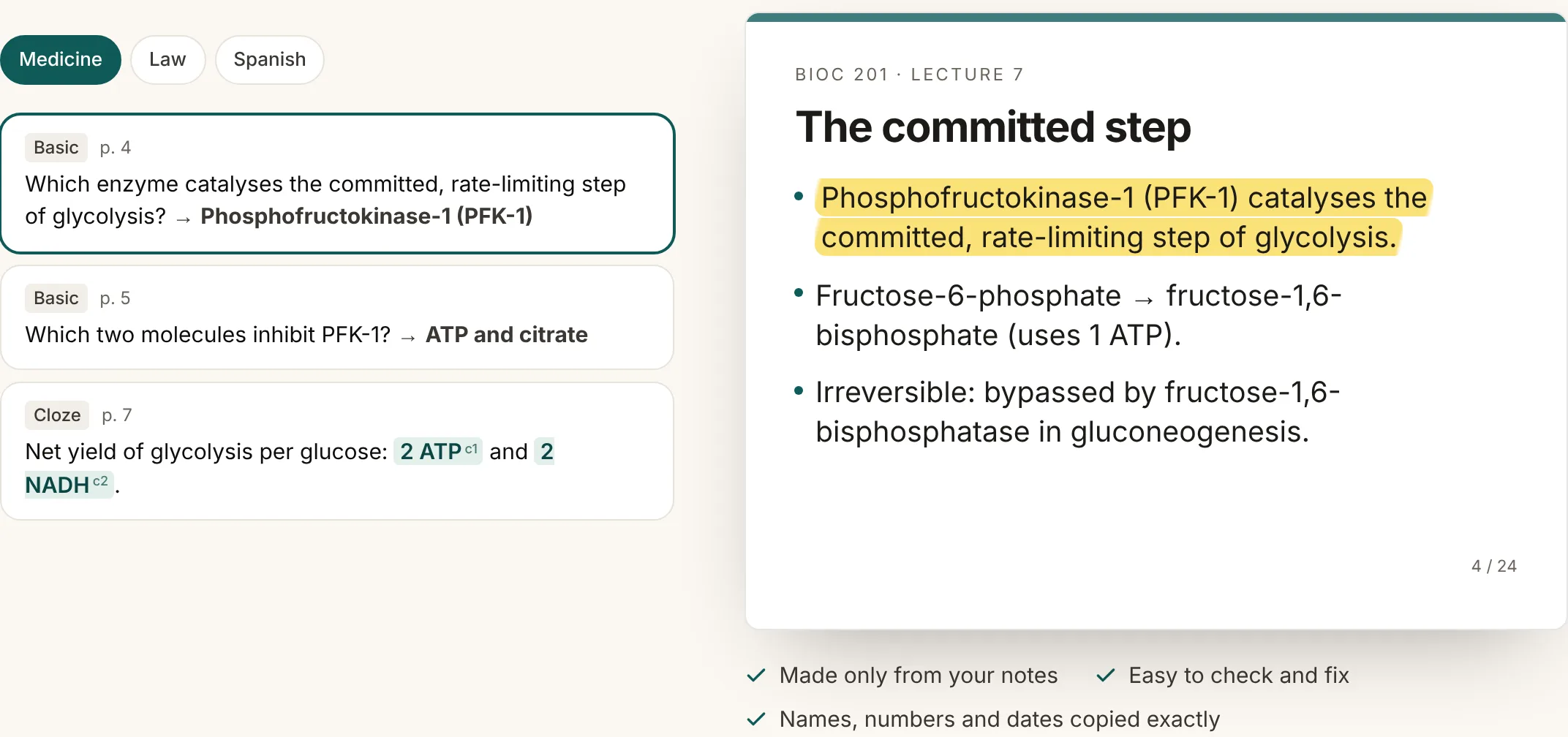
Every card shows the line and page it came from, and a check called Source Check removes any card whose quote isn’t in your file. You still read the cards: the point is that checking one takes a glance at the quote, not a search through 68 slides.
Mistakes that waste the most time
- A card for every bullet. Most bullets are context, not exam facts.
- Cards that only make sense next to the slide, like "What does this graph show?".
- Making the cards weeks after the lecture, when the review pile is already huge.
- No tags. Without the lecture and slide, a confusing card is a dead end.
Which one I use
I upload everything now, to AnkiDecks (I built it for exactly this). Making cards by hand was too slow for me: two hours for one 56-slide pathology lecture.
Try it on one of your lectures
Upload the PDF or PowerPoint and check each card against the line and page it came from. The free plan makes 3 decks a month (up to 15 pages each), and downloading to Anki is never paywalled.
Make cards from a lectureFree to try · No credit card needed
Questions
- Can Anki import a PowerPoint or a PDF?
- No. Anki imports text files, Anki packages (.apkg) and Mnemosyne files. The slides have to become cards first, by hand or with a tool, and then go into Anki as a text file or an .apkg.
- How many cards should one lecture make?
- There's no right number. In our test, four lectures (153 pages) made 414 cards, about 2.7 a page, plus 43 picture cards for diagrams. Dense lectures make more.
- Should I use cloze or basic cards for slides?
- Cloze for facts in a sentence or a list, basic for a clear question and answer. Diagrams work best as image occlusion, built into Anki since version 23.10.
- Is it OK to upload my school's slides?
- Use them for your own studying and don't share the deck publicly. AnkiDecks keeps your files private and never trains on them.