Used by 6,000+ students
Automatic image occlusion for Anki
No more drawing every box by hand. Upload slides, a PDF or a photo. Each label on a diagram is hidden under a box, and you guess what's underneath, one at a time.
Slides, PDFs and photos · 20 diagrams a month free, 300 on Pro
Free to start · Quote and source on every card
How it works
- UploadSlides, a PDF or a photo.
- Check the boxesMove, add or remove any box.
- DownloadOpens in Anki's own Image Occlusion.
From a real file to Anki cards
The file
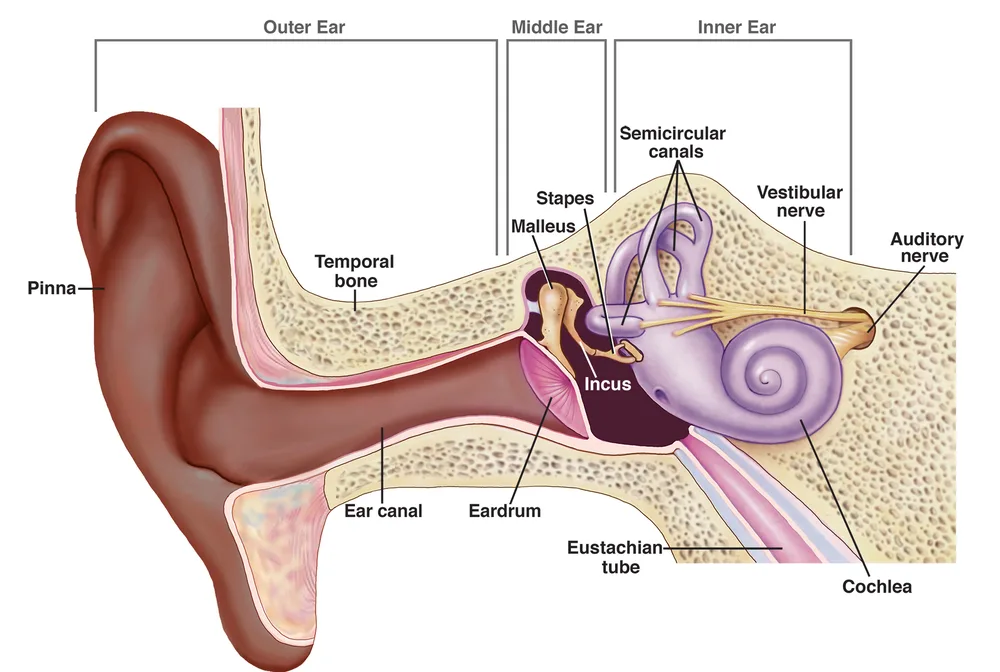
What AnkiDecks made
Made for diagrams
Labels found for you
Each label on a diagram gets a box. Busy diagrams get the main structures first, at most 12 boxes.
Change any box
Move, resize, add or remove boxes on the Review screen before you download.
Uses Anki's own Image Occlusion
Cards open in Anki's built-in Image Occlusion (Anki 23.10 and newer): hide all, guess one.
Slides, PDFs and photos
Diagrams are found on slide pictures, PDF pages and photos of a textbook. The rest of the lecture becomes Cloze and Basic cards.
Why not draw the boxes yourself?
Anki's own Image Occlusion is free and good. AnkiDecks does the drawing for you.
Free to start. Pro when you study every day.
Free is enough to try it on a few lectures. Pro covers one or two classes every week, Max every class.
Pro
For one or two classes$7.99/ month
or $54.99 a year (5 months free)
- 50 decks a month
- Up to 100 pages per file
- 300 image occlusion diagrams a month
- Your decks are made first when it's busy
Cancel anytime
Big textbooks or every class? Max takes files up to 200 pages and unlimited decks. Compare plans · Export to Anki is never paywalled.
Questions
Is it free?
Yes. Free includes 20 image occlusion diagrams a month, Pro 300. Downloading to Anki is never paywalled.
Which Anki version do I need?
Anki 23.10 or newer, which has Image Occlusion built in. The cards open in its editor, so you can still change them inside Anki.
Does it work with photos of a textbook?
Yes. A clear photo of a labeled diagram works. Straight, sharp and well lit gives the best boxes.
What if a box is wrong?
Move it, resize it or remove it on the Review screen, or add your own. Nothing goes into the deck until you download.
What about the Image Occlusion Enhanced add-on?
It was the usual way to make these cards before Anki 23.10 built Image Occlusion into Anki itself. With either one you draw each box by hand. AnkiDecks draws the boxes for you and makes cards for Anki's built-in Image Occlusion, so you don't need the add-on.
Can I hide one label at a time instead of all?
Cards use Anki's "hide all, guess one" mode: every label is covered and one is asked at a time.
Does it work on AnkiMobile and AnkiDroid?
Yes. You download a normal .apkg deck. It opens in Anki on a computer, AnkiMobile and AnkiDroid, with no add-ons. Image occlusion cards need Anki 23.10 or newer.
Image occlusion in Anki, explainedHow to turn lecture slides into Anki cardsCloze or Basic: which card when
Make cards from anything
Your diagrams, boxes already drawn
Upload a lecture with diagrams and check the boxes in a minute.
Create flashcardsFree to try · No credit card needed