BlogAnki how-to
How to use Anki: a beginner's guide (2026)
Install it, add cards, press the right button, and keep reviews under control.
Aribo··16 min read
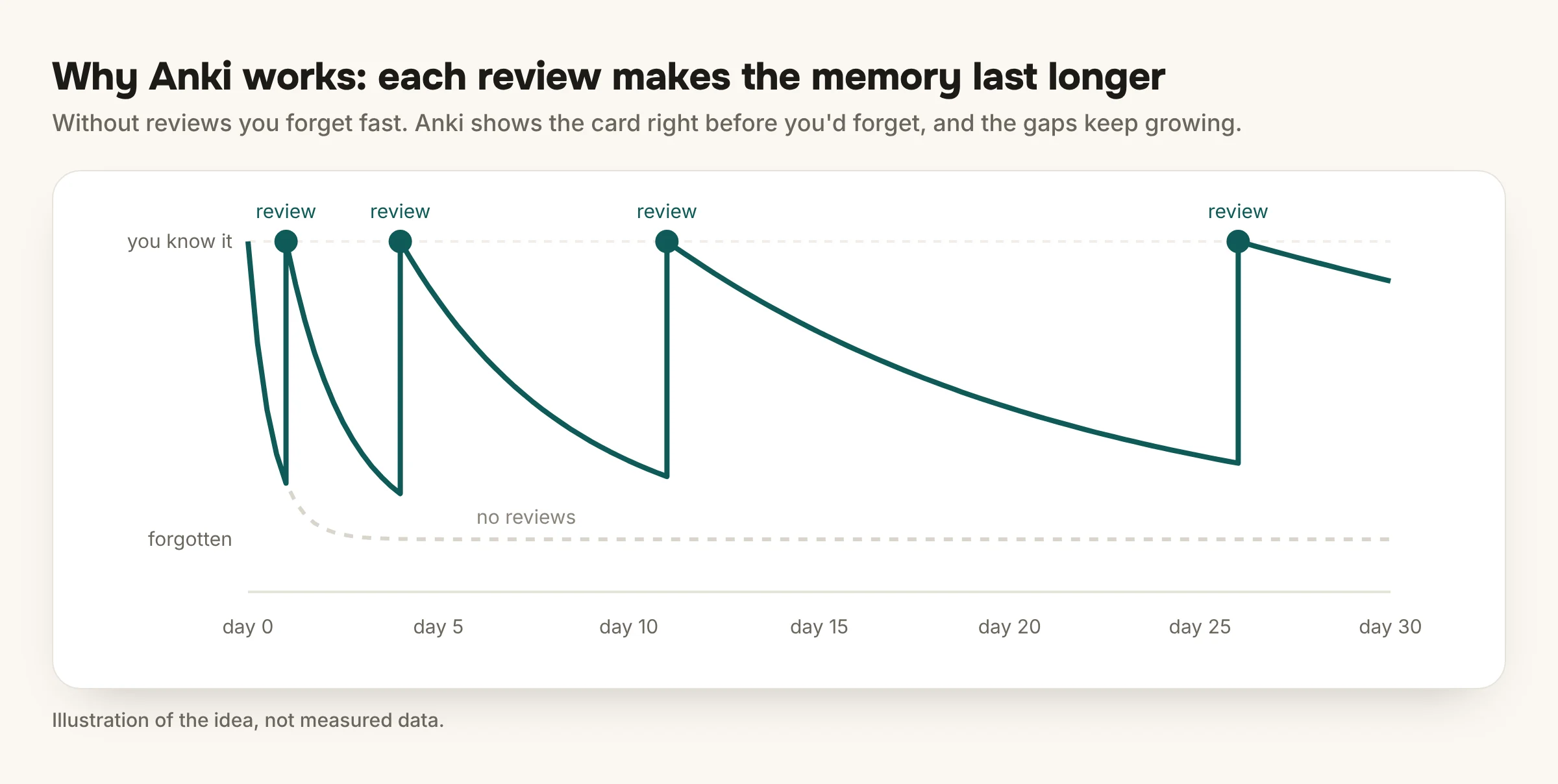
Anki is a free flashcard app that shows each card right before you'd forget it. Install it, add a deck, do 10 to 20 new cards a day, and press Again when you forget and Good when you know it.
What Anki is, in one minute
The trick is called spaced repetition. Instead of showing every card every day, Anki waits until you’re about to forget each one. A card you know well comes back in weeks or months; a card you keep missing comes back the same day. That’s why a short session every day does more than rereading your notes the night before.
Three words you’ll see everywhere:
- Deck: a group of cards, like “Cardiology” or “Spanish verbs”. Decks can sit inside other decks (manual).
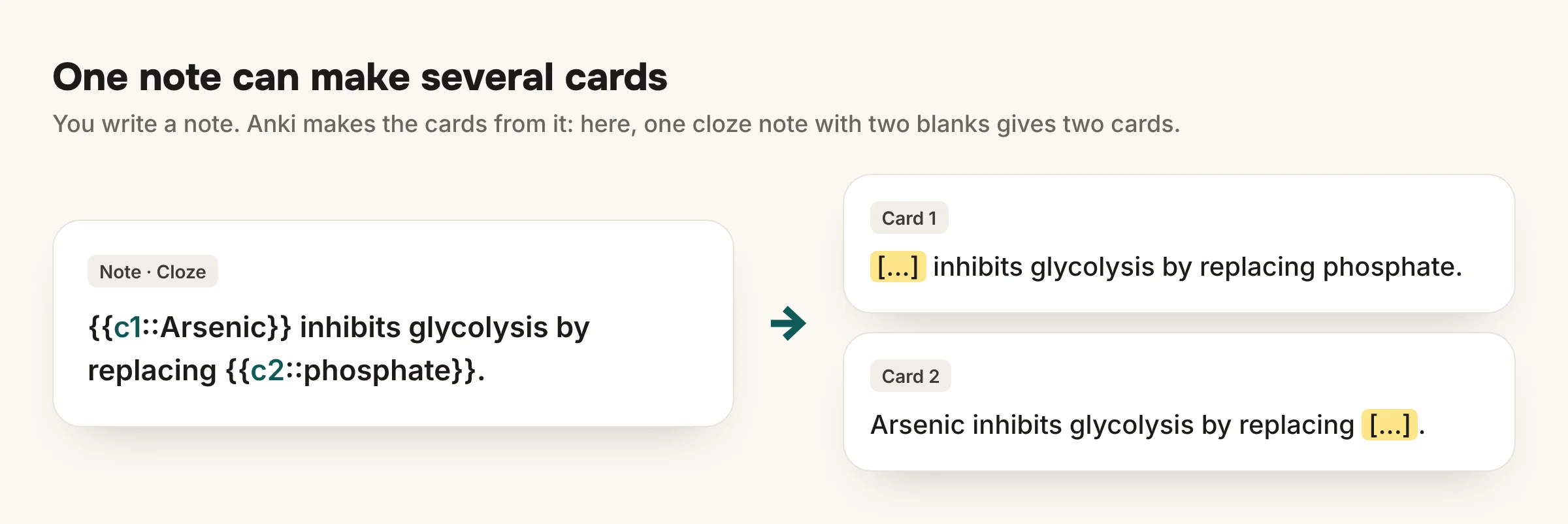
- Note: what you write. Card: what you study. One note can make several cards.
- Review: a card coming back after you’ve learned it once.
Why it works: the research
Anki isn’t a study hack someone made up. It puts two of the best-tested ideas in learning science into one app: spreading your reviews out over time, and testing yourself instead of rereading. Here’s what the research actually found.
Spacing beats cramming
The forgetting curve goes back to 1885, when Hermann Ebbinghaus tested himself on lists of nonsense syllables and measured how fast they faded (Ebbinghaus). Since then it’s been tested hundreds of times. A 2006 review pooled 839 results from 317 experiments, and the pattern held: the same study time, spread out, beats one long session (Cepeda et al., 2006).
How far apart? A 2008 study taught more than 1,350 people a set of facts, reviewed them after a gap, and tested them up to a year later. The best gap grew with how long you need to remember: about 20 to 40% of the time until a test a week away, down to about 5 to 10% for a test a year away. At the best gap, people recalled 64% more than with no gap at all (Cepeda et al., 2008).
| Your test is in | Best gap before reviewing |
|---|---|
| 1 week | about 3 days |
| 5 weeks | about 8 days |
| 10 weeks | about 12 days |
| 50 weeks | about 27 days |
Read it like this: the further away your exam, the longer you should wait before reviewing. With an exam five weeks out, looking at a fact again about a week after you learned it beats looking at it the next day, and it beats cramming it the night before by a lot. Reviewing too soon feels productive but adds little; waiting a bit, until it’s slightly hard to remember, is what makes it stick.
You don’t have to work any of this out. That’s the scheduler’s job. Every time you press Good, Anki pushes the card further out, from a day to a few days to weeks to months. Press Again and the card comes back soon, with shorter gaps for a while. With FSRS, the gap for each card is worked out from your own answer history.
Testing yourself beats rereading
In a 2008 study in Science, students learned 40 Swahili–English word pairs (like mashua, boat). Once they’d got a word right, some kept being tested on it and some only kept studying it. A week later, the students who kept testing remembered about 80% of the words. Those who stopped testing remembered 36% and 33%, even the ones who kept studying. And every group predicted it would remember about half (Karpicke & Roediger, 2008).
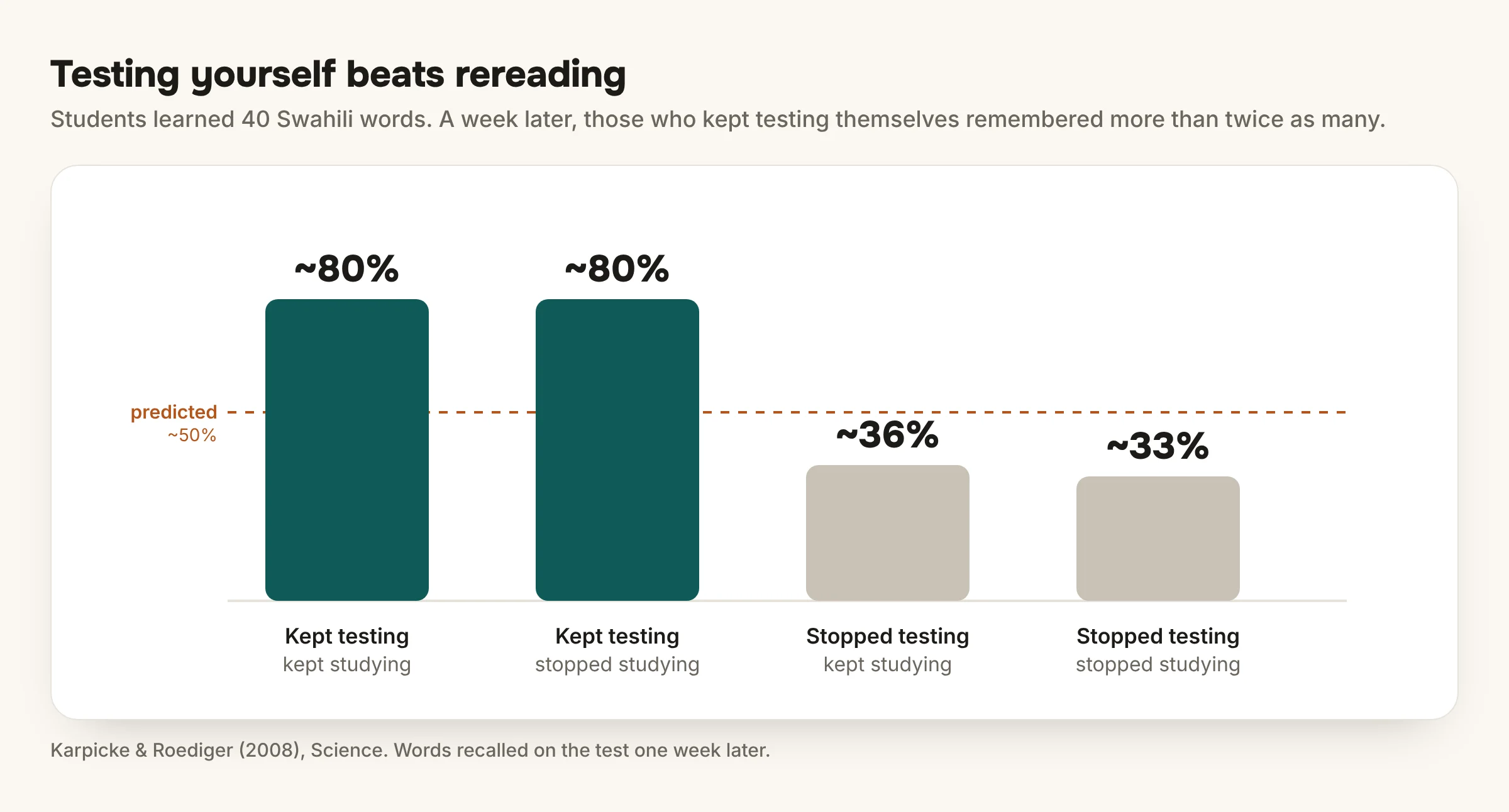
Two lessons come out of this. First, pulling an answer out of your memory is the practice itself. Reading the answer again isn’t, even though it feels the same while you do it. Second, you can’t trust that feeling: every group thought they’d remember about half, and they were wrong in both directions.
Every Anki card is a small test. You see the question, try to answer, and only then see the answer. So you get the testing effect on every card without having to plan it.
What a big review of study methods found
In 2013, five psychologists rated ten common study techniques by how well the evidence supports them. Only two were rated high: practice testing, and spreading study out over time. Rereading, highlighting and summarizing, which are what most students actually do, were rated low (Dunlosky et al., 2013).
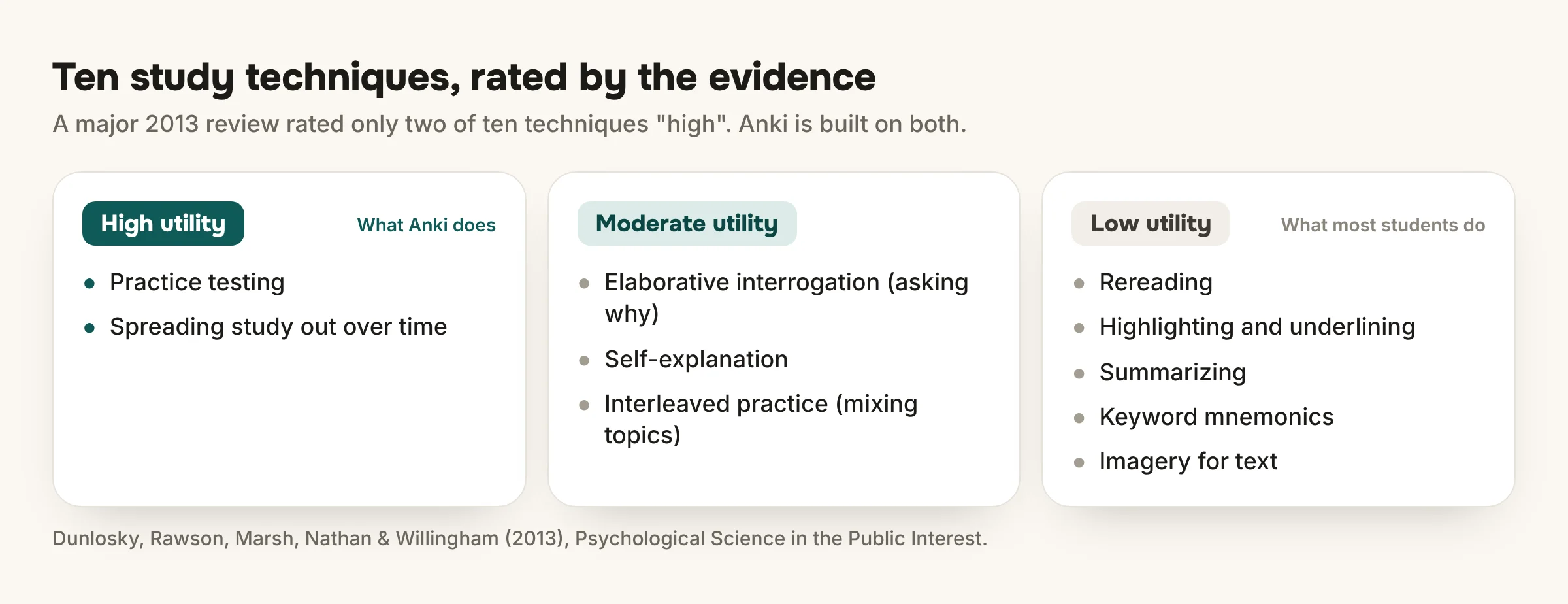
The moderate ones are worth using too, and they fit around Anki. Asking yourself why a fact is true (elaborative interrogation) and explaining it in your own words (self-explanation) are what you do when you read a lecture before making or checking its cards. Mixing topics (interleaving) happens on its own if you study a parent deck: Anki mixes the cards from all the decks inside it, so cardiology and renal come up side by side instead of in blocks.
Anki and medical exams
Medical students have studied Anki directly, too. In a survey of 72 students, every 1,700 unique Anki cards went with about one extra point on USMLE Step 1, after accounting for other academic factors (Deng et al., 2015). A 2021 survey of 201 students found Anki use was linked to higher Step 1 scores, and more consistent use to higher scores still (Lu et al., 2021).
Be fair to the evidence: those two are surveys, so they show a link, not that Anki caused the higher scores (students who use Anki may differ in other ways). Step 1 has also been pass/fail since 2022. The spacing and testing studies above are controlled experiments, which is why they’re the stronger evidence.
What this means for your studying
- A little every day beats a lot at once. Twenty minutes of reviews daily does more than three hours the weekend before.
- Test, don’t reread. Try to answer before you look. If you can’t, press Again and move on.
- Trust the schedule, not the feeling. A card that feels easy can still be gone in a week, and one that felt hard often sticks. Let Anki decide when it comes back.
Step 1: Install Anki
Get Anki only from the official links. The App Store and Play Store have copycat apps with similar names.
| Where you study | App | Price | Get it |
|---|---|---|---|
| Windows, Mac, Linux | Anki | Free | apps.ankiweb.net |
| Android | AnkiDroid | Free | Google Play (by AnkiDroid Open Source Team) |
| iPhone, iPad | AnkiMobile | $24.99 once (US; other countries vary) | App Store (by Ankitects Pty Ltd) |
| Any browser | AnkiWeb | Free | ankiweb.net |
Then make a free AnkiWeb account and press Sync in Anki. Sync keeps your phone and computer on the same cards, and AnkiWeb also lets you study online (manual). If you don’t want to pay for AnkiMobile yet, studying in your phone’s browser on AnkiWeb is free.
AnkiMobile is the one paid app, and the money funds Anki’s development. The computer and Android apps are free with no limits.
Step 2: Get your first cards
An empty Anki does nothing. You have three ways to fill it:
Download a shared deck
In Anki, click Get Shared at the bottom of the deck list, find a deck, and press Download. Then open the file in Anki (manual). Fast, but the cards follow someone else’s course, not yours. The manual says shared decks work best as a supplement to your own material, not a replacement.
Make cards by hand
Click Add, pick a type, write the front and back. Use Basic for a clear question and answer, and Cloze to hide words in a sentence (select the words and press the cloze button). The manual calls making your own deck “the most effective way to learn a complex subject”, because writing the card is half the learning. The catch is time: one lecture can take an hour or two. My 7 rules for good Anki cards show what makes a card stick.
Make cards from your own lectures
The middle way: turn your own slides, PDFs or notes into cards with a tool, then check them. That’s why we built AnkiDecks: upload the file, and every card shows the page and line it came from, so checking takes a glance. The full walkthrough is in how to use AnkiDecks.
Opening a deck file (.apkg)
- Computer: double-click the .apkg file, or in Anki choose File, then Import.
- iPhone or iPad: tap the file (in Files, Mail or Safari’s downloads), then Share or Open in, and pick AnkiMobile (AnkiMobile manual).
- Android: tap the file and open it with AnkiDroid, or in AnkiDroid use the menu, then Import (AnkiDroid manual).
Importing someone else’s deck? On Anki 23.10 and newer, leave “Import any learning progress” unticked, so you start fresh instead of with their review history (manual).
Step 3: Your first study session
Click the deck, then Study Now. Read the front, answer in your head (or out loud), then show the answer. Be honest: if you can’t answer in about 10 seconds, the manual says it’s better to just show the answer and move on (manual). Then press one of four buttons:
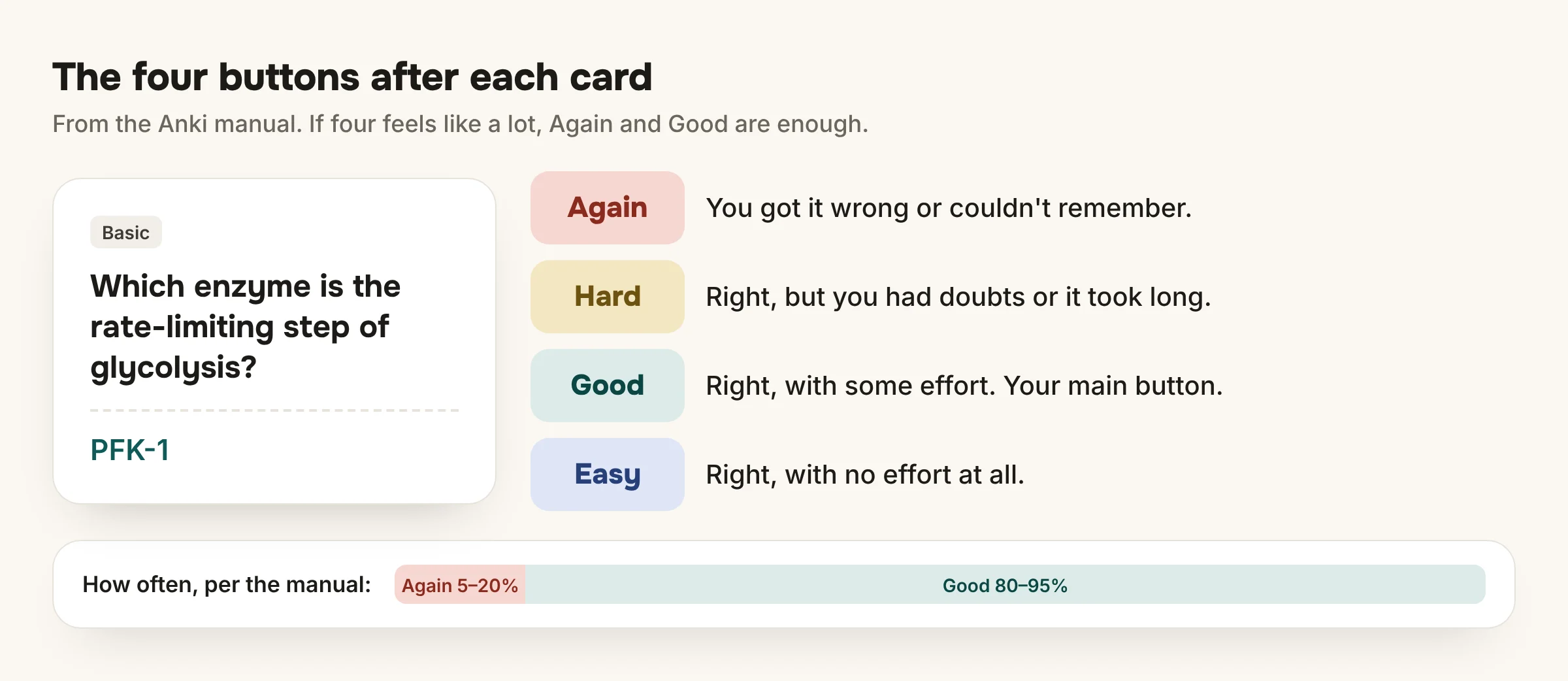
The rule that saves the most pain: if you got it wrong, press Again, not Hard. Hard means you got it right with difficulty. Pressing Hard on a card you forgot tells Anki you know it, and it comes back too late. If four buttons feel like too much, the manual says using only Again and Good is fine.
Anki keeps showing cards until today’s are done. Then it tells you to come back tomorrow, and that’s the whole job.
Step 4: How many new cards a day
This is where beginners burn out. Every new card you learn today comes back as reviews for weeks. The manual itself warns about people who “excitedly studied hundreds of new cards over their first few days” and then drowned in reviews (manual).
| New cards a day | Reviews a day, a month later | About how long |
|---|---|---|
| 10 | about 40 | about 12 minutes |
| 20 | about 80 | about 25 minutes |
| 50 | about 200 | about 1 hour |
Start with 10 to 20 new cards a day. You can raise it once your reviews feel easy. To set it: click the gear next to the deck, then Options, then New cards/day. Our cards-a-day guide has a calculator for your own exam date.
Step 5: Two settings for day one
- Turn on FSRS. It’s Anki’s newer scheduler and it times reviews better. In Deck options, scroll down to FSRS and switch it on. It works on Anki and AnkiMobile 23.10 or newer, and on AnkiWeb (manual).
- Leave desired retention at 90%. That’s the default, and the manual calls it a good balance of retention and workload. Higher means a lot more reviews. More in what desired retention to set.
Everything else is fine on the defaults for your first months. The best Anki settings guide covers the rest when you’re ready.
Three ways students use Anki
The steps above are the same in every subject. What changes is the file you start from and the card type that fits it. In the diagram, each column starts with a typical file and shows two cards that come out of it. Below it, each subject gets what to start from, which cards to make, and the one mistake to avoid.
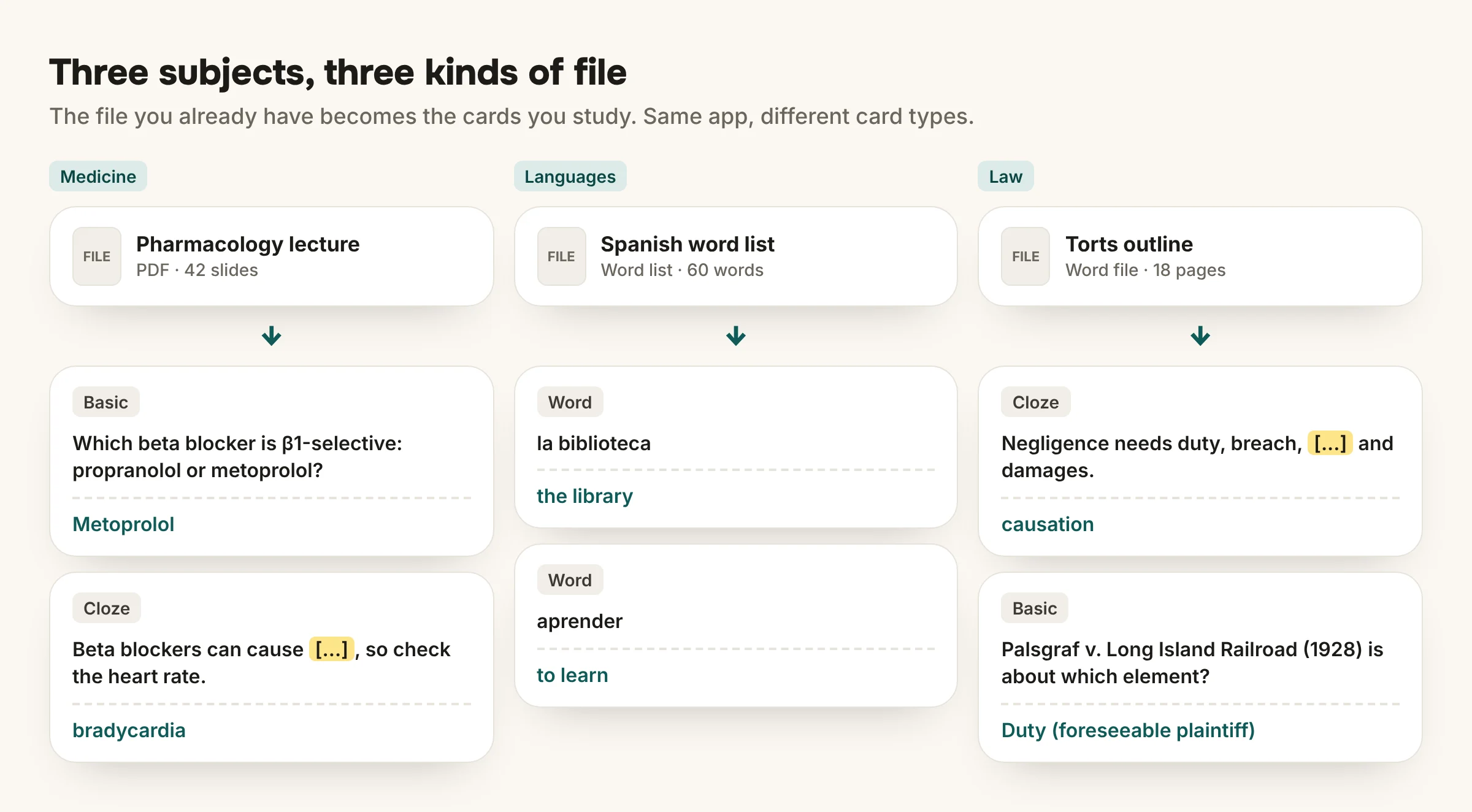
Medicine and nursing: this week’s lecture slides
- Start from: the lecture slides, as a PDF or PowerPoint, the same day or the day after the lecture.
- Make: basic cards for “which drug, which class, which mechanism” questions, and cloze cards for facts inside a sentence, like a side effect or a first-line treatment. For anatomy diagrams, Anki’s built-in Image Occlusion (Anki 23.10 and newer) hides the labels so you can name them.
- Avoid: saving a whole block for the week before the exam. Cards added late don’t have time to space out, so you end up cramming them anyway.
Pharmacology and microbiology are where Anki shines: lots of names, each with a few facts attached, and they come back in later courses. Tag each card with its lecture or block, so you can find a topic again before a quiz. More in Anki for pharmacology and Anki for medical school.
Languages: a word list
- Start from: your textbook’s word list for the chapter, or a list you keep yourself of words you met in class or reading.
- Make: one card per word, the word on the front and the meaning on the back, with an example sentence under the meaning so you see the word in use. Once that direction is easy, add the reverse (meaning to word) with the “Basic (and reversed card)” type, because recognizing a word and producing it are different skills.
- Avoid: adding a whole dictionary at once. 10 to 20 new words a day, every day, adds up to thousands in a year.
Vocabulary is Anki’s classic use, because a word is exactly one fact with one answer. Speaking and listening still need practice outside Anki; Anki makes sure the words are there when you need them. More in Anki for Spanish and Anki for languages.
Law: an outline or case notes
- Start from: your course outline or case notes, as a Word file or PDF.
- Make: cloze cards for the parts of a rule (“negligence needs duty, breach, causation and damages”, one blank per card), and basic cards both ways for cases: case to the point it stands for, and rule to its leading case.
- Avoid: one giant card per rule. A rule with four parts is four cards; a card you can’t answer in a few seconds is a card you’ll keep failing.
Law is less about single facts and more about rules and their parts, and an exam asks you to apply them to a new story. Anki makes sure the rules and cases come to mind instantly; practice questions and essays train you to use them, so do both. More in Anki for law school.
If you’d rather not type the cards, AnkiDecks makes all three kinds from the file itself, each card linked to the line it came from.
Beginner mistakes to skip
- Too many new cards. Hundreds on day one feels productive and turns into a wall of reviews by day four. Pick a number you could keep up on your worst week.
- Hard instead of Again. Wrong is Again. Every time.
- Skipping days. Reviews pile up. Ten minutes on a bad day beats zero; if you do fall behind, Anki shows the cards that waited longest first, so you can pick up where you left off.
- Giant cards. One card, one fact. “List the 7 causes of…” is a card you’ll fail forever. Split it, or use a cloze with one blank per item.
- Cards you don’t understand. Anki is for remembering, not for learning something the first time. Read the lecture, then make or check the cards.
A daily routine that holds up
- Every day: do all your reviews first (around 15 to 30 minutes at 10 to 20 new cards a day).
- After each lecture: add that lecture’s cards the same day or the next, while it’s fresh.
- New cards: your daily limit, no more.
- Once a week: look at cards you keep missing and rewrite or split them.
That’s it. Install, add a deck, press Good or Again honestly, and show up tomorrow.
Get your first deck from your own lecture
Upload a PDF, PowerPoint or Word file and get Anki cards with the page and line each one came from. The free plan makes 3 decks a month (up to 15 pages each), and downloading to Anki is never paywalled.
Make my first deckFree to try · No credit card needed
Questions
- Does spaced repetition actually work?
- Yes. It's one of the best-supported findings in learning research. A 2006 review of 317 experiments found that spreading study out beats cramming the same amount of time, and a 2013 review of ten study techniques rated only two as high utility: practice testing and spreading study out. Anki is built on both.
- Is Anki good for subjects other than medicine?
- Yes. Anki works for anything with facts you need to remember: languages (one card per word), law (rules and their elements), pharmacology, history dates, exam prep like the MCAT or SAT. The card type changes with the subject; the daily routine stays the same.
- Is Anki free?
- Yes on computers (Windows, Mac, Linux), on Android (AnkiDroid) and in the browser (AnkiWeb). The iPhone and iPad app, AnkiMobile, is a one-time purchase ($24.99 in the US App Store) that helps fund Anki's development.
- Can I use Anki on iPhone without paying?
- Yes: AnkiWeb lets you study in the browser on your phone for free, synced with Anki on your computer. AnkiMobile is nicer to use, but it isn't required.
- What do Again, Hard, Good and Easy mean?
- Again: you got it wrong or couldn't remember. Hard: right, but you had doubts or it took long. Good: right with some effort. Easy: right with no effort. The Anki manual says Good should be the button you press most, about 80 to 95% of the time.
- How many new cards a day should a beginner do?
- 10 to 20. Every new card comes back as reviews later: with Anki's default settings, 20 new cards a day turns into about 80 reviews a day a month later (around 25 minutes).
- Should I download a deck or make my own?
- Both work. Anki's manual says making your own cards is the most effective way to learn a complex subject, and that shared decks work best as a supplement to your own material. A middle way is to make cards from your own lectures with a tool and check them.
- What is the difference between a note and a card?
- You write a note; Anki makes cards from it. A basic note makes one card, a 'basic and reversed' note makes two, and a cloze note makes one card per blank.