BlogAnki how-to
How to make good Anki cards (and make them faster)
7 rules with before-and-after examples, and how to make a lecture's cards in minutes.
Omar··10 min read
A good Anki card asks one small question with a short answer. Split lists into several cards, use cloze for sentences and image occlusion for diagrams.
Most bad cards are just too big. Here are the rules I use, with before-and-after examples, and how to make a lecture’s cards fast.
Make your first card in Anki
In Anki you add notes, and Anki makes the cards from them. It takes about ten seconds:
- Click Add at the top of the main window.
- Pick the Type (Basic, Cloze or Image Occlusion) and the Deck.
- Type the front and the back.
- Press Ctrl+Enter (Command+Enter on a Mac) to add it (Anki manual). The window stays open for the next one.
That’s the easy part. Whether you still remember the card in three weeks depends on how you write it.
Pick the card type
Anki comes with three kinds of cards that cover almost everything a student needs. Pick the one that fits the fact, not the one you’re used to.
Which card type?
Which kidney hormone makes red blood cells?
Erythropoietin (EPO)
Basic
A clear question with one short answer.
The kidneys turn vitamin D into its active form, calcitriol.
Cloze
A fact inside a sentence, a step in a list, a word in a definition.
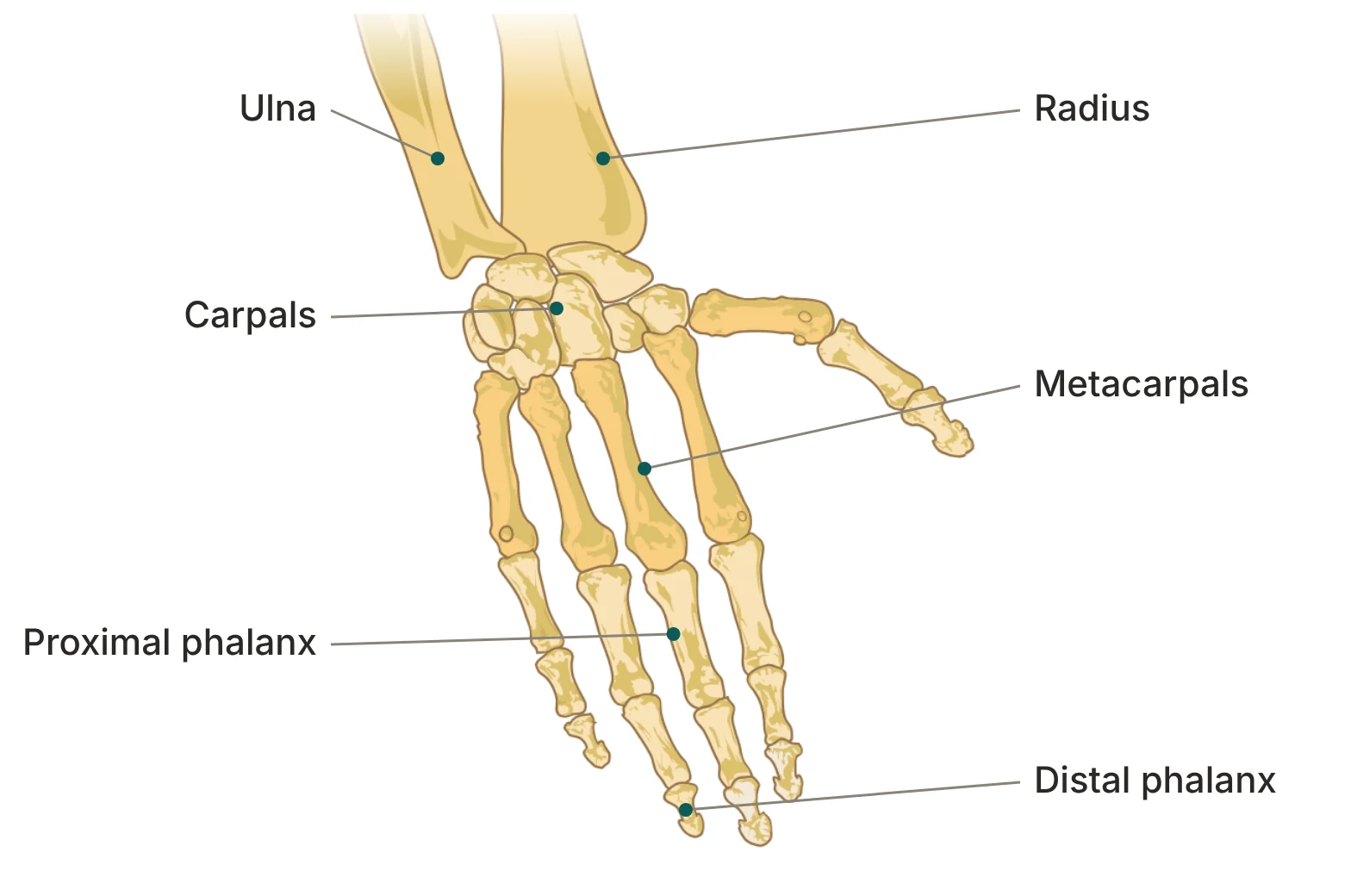
Image occlusion
Diagrams and labelled pictures: hide a label, name it.
Not sure between cloze and basic? I wrote a whole post on cloze vs basic. For diagrams, image occlusion is the one most students skip and shouldn’t.
7 rules for cards that stick
Most of these come from Piotr Wozniak’s “Twenty rules of formulating knowledge”, written in 1999 by the creator of SuperMemo, one of the first spaced repetition programs. They still hold up. These are the seven that matter most when you make cards from lectures and textbooks.
1. Understand it before you make the card
Wozniak’s first rule is “Do not learn if you do not understand”. A card for something you don’t get only teaches you to repeat words. Read the slide, make sure it makes sense, then make the card. If it doesn’t make sense, that’s a question for your notes or your lecturer, not a card.
His third rule, “Build upon the basics”, goes with it. Make the simple cards first (what a word means, where something happens), then the ones that build on them. A card about how a drug works is much easier once you have the card for the receptor it acts on.
2. One fact per card
This is the big one, his rule 4: “Stick to the minimum information principle”. Simple cards are easier to remember and easier for Anki to schedule, because you either know the one thing or you don’t. A card with five facts fails if you forget any one of them, so you keep seeing four facts you already know.
One card, five facts
What do the kidneys do?
Filter the blood, control blood pressure, make erythropoietin, activate vitamin D, keep the acid–base balance.
Which hormone made by the kidneys tells the bone marrow to make red blood cells?
Erythropoietin (EPO)
The kidneys turn vitamin D into its active form, calcitriol.
Why: Each new card asks for one thing, so a wrong answer tells you exactly what you forgot. The other three functions get their own cards too.
3. Keep answers short
If you can’t say the answer in one breath, the card is too big. “Explain…” cards feel thorough when you make them and turn into a guilty “Good” press when you review them. Pull out the core of the idea instead.
An essay on the back
Explain the Frank–Starling mechanism.
The heart’s stroke volume rises when the volume of blood filling it rises, because the stretched muscle fibres contract more strongly, so the heart pumps out what comes in…
The more the ventricle fills and stretches, the more strongly it contracts.
What happens to stroke volume when more blood fills the heart?
It rises
Why: Each answer is a few words you can say without looking. Together they cover the idea; each one alone is easy to grade honestly.
4. Don’t put lists on one card
Wozniak’s rules 9 and 10 are “Avoid sets” and “Avoid enumerations”: “list the…” cards are the hardest to remember. If you really need the order (stages, steps, pathways), use cloze cards that each hide one item and show its neighbours. In Anki, a new cloze number (c1, c2, c3) makes a new card.
A list to recite
List the stages of mitosis in order.
Prophase, metaphase, anaphase, telophase
Mitosis: prophase → metaphase → anaphase
Mitosis: metaphase → anaphase → telophase
Why: Each card hides one stage and shows the ones around it, so you learn the order one link at a time.
5. Make it mean one thing
A card that could have two right answers will mark you wrong for being right. Add just enough context that only one answer fits: the subject, the situation, a word in the other language.
A word with two meanings
el banco
the bank
el banco (where you keep your money)
the bank
Why: “Banco” is also a bench. The short hint in brackets makes the card mean one thing, so “bench” is never marked wrong.
6. Use pictures for anything visual
Rule 6 is “Use imagery”, and rule 8 says hiding part of a picture (“graphic deletion”) works as well as a cloze. That’s image occlusion: cover the labels on a diagram and Anki asks you for one at a time. It’s built in since Anki 23.10 (manual). Anatomy, pathways, maps, circuits: if your lecturer drew it, make it an image occlusion card instead of describing it in words.
7. Tag where it came from, and fix the cards you keep failing
Tag each card with the lecture and slide (for example Renal::Lecture-4 and slide_12). In three weeks a card will make no sense, and the tag takes you back to the slide in seconds.
When you get a card wrong 8 times, Anki tags it as a leech and suspends it (Anki manual). Don’t just unsuspend it: a leech is almost always a card that breaks one of the rules above. Split it, shorten it, or add a picture.
One of my own leeches was exactly this kind of card. I kept failing it until I split it up:
If the card is already small and still won’t stick, give it a hook. Wozniak’s rule 7 is “Use mnemonic techniques”: a silly sentence, a rhyme, a picture in your head. Put the mnemonic on the back of the card, under the answer, so you see it every time you check. Our amino acids guide gives a reason you can remember for each of the 20 one-letter codes, which works the same way.
One of my leeches
What is the difference between Crohn’s disease and ulcerative colitis?
Crohn’s can affect any part of the gut, from mouth to anus, through the whole wall, in patches. UC starts in the rectum, spreads up the colon without gaps and affects only the inner lining…
Crohn’s disease can affect any part of the gut, from mouth to anus.
Ulcerative colitis starts in the rectum and spreads up the colon.
Why: “What’s the difference between…” cards ask for a whole table at once, so you fail them on whichever row you forgot. One card per difference, and each one sticks.
One slide, start to finish
Rules are easier to see on a real slide. Here’s a typical first-year biochemistry slide and what I’d do with each line. The question for every line is the same: would the exam ask about this?
One slide, start to finish
Lecture 7 · Glycolysis · Slide 4
- Glycolysis happens in the cytoplasm of every cellCard
- Hexokinase traps glucose in the cell as glucose-6-phosphateCard
- PFK-1 is the rate-limiting stepCard
- Net yield: 2 ATP per glucoseCard
- First described by Embden, Meyerhof and ParnasSkip: history
- See figure 7.2 in the handoutSkip: a pointer
Glycolysis takes place in the cytoplasm.
Hexokinase traps glucose in the cell by turning it into glucose-6-phosphate.
Which enzyme catalyses the rate-limiting step of glycolysis?
PFK-1 (phosphofructokinase-1)
Glycolysis makes a net 2 ATP per glucose.
A few things to notice:
- Four facts, four cards. Not one card called “Glycolysis”, and not six cards for six lines.
- Cloze for the sentences, basic for the question. “Which enzyme is rate-limiting?” is a clean question with one answer, so it’s a basic card. The other three are facts inside sentences, so they’re clozes.
- The history line is skipped. Who discovered the pathway is interesting, but it’s context, not an exam fact. If your lecturer says it will be examined, make the card. Otherwise, leave it.
- “See figure 7.2” is a pointer, not a fact. If the figure matters, the card belongs to the figure: make it an image occlusion card from the handout.
Tag all four with the lecture and slide, and that slide is done.
A 30-second check before you press Add
Before each card goes in, run it past these. If one fails, fix it now: it’s much cheaper than fixing a leech later.
- Can I answer it in one breath, without reading?
- Is there only one right answer?
- Does it still make sense without the slide next to it?
- Is it one fact, or did I sneak in two with an “and”?
- Is it a list? Then it should be several cards or overlapping clozes.
- Is it a diagram described in words? Then it should be image occlusion.
- Is it tagged with where it came from?
Seven questions sound like a lot. After the first few dozen cards you stop asking them and start writing cards that pass them.
How to make cards faster
Whether you make them by hand or not, these save the most time:
- Keyboard first. Ctrl+Enter adds the card. When you cloze, hold Alt (Option on a Mac) to keep the same number, so both words are hidden on one card (manual).
- Make the cards the same day as the lecture. You still remember what mattered, and the pile never grows.
- Skip the context. Not every bullet is an exam fact. One card for what the exam will ask beats five for everything on the slide.
- Use the cloze maker for long sentences: paste the text, click the words to hide, copy it into Anki.
- Let a tool make the first draft from the lecture file, and spend your time checking it.
Making one lecture’s cards
By hand in Anki
My 56-slide pathology lecture
about 2 hUploaded to AnkiDecks
Our test: four lectures of 13 to 68 pages
2 to 4 min
That last one is the biggest saving, and it’s why I built AnkiDecks.
Why I make my cards in AnkiDecks
By hand, my 56-slide pathology lecture took about two hours, before a single review. Pasting slides into ChatGPT is faster, but you get a wall of text to copy into Anki, with no slide numbers and the odd fact that isn’t in your notes (I tested ChatGPT, Claude and Gemini on this).
AnkiDecks sits in between. You upload the PDF, PowerPoint or your notes, it drafts the cards in a few minutes following the rules above (one fact per card, short answers), and you stay in charge of every single one:
You stay in charge of every card
Before: you choose
How many cards
FewerNormalMoreCustomCard type
ClozeBasicBothDiagrams
Image occlusion
Plus the card language, the pages to use and the deck name.
After: you check each card
Glycolysis makes a net 2 ATP per glucose.
Source · Slide 4
“Net yield: 2 ATP per glucose”
Then Export to Anki (.apkg) or CSV. Never paywalled.
- You choose before it starts: how many cards (Fewer, Normal, More or your own number), cloze, basic or both, image occlusion for diagrams, the card language and the deck name.
- You review them as real cards, not as a wall of text. Each one sits next to the exact line and page it came from, highlighted, so checking it takes a glance.
- You fix them right there: Edit a card, Delete it (with Undo), Regenerate one you don’t like, ask for More like this from the same page, or add a card of your own. On picture cards you can change which labels are hidden.
- Then it goes into Anki as a ready deck (.apkg) or a CSV. Downloading is never paywalled.
Behind that, a check we call Source Check drops any card whose quote isn’t in your file, so every card you see is tied to a real line you can check. Here’s a real card it made:
A card that shows where it came from
Front
What is a carrier?
Back
A person with inapparent infection capable of transmitting the pathogen to others.
Source · Page 2
“…a carrier is a person with inapparent infection who is capable of transmitting the pathogen to others.”
Premade decks (like the big shared ones for medical exams) are great for the content everyone needs. Your own lecturer’s slides are what they can’t cover, and that’s where your own cards earn their place.
How many cards per lecture?
There’s no target. When we ran four real lectures (153 pages) through AnkiDecks, we got 414 cards, about 2.7 a page, plus 43 diagram cards. A dense pathology lecture makes more; a slide deck that’s mostly pictures makes fewer. Aim for every fact you’d be annoyed to miss in the exam, and nothing you’d skip if a friend quizzed you.
Then keep the daily load sane: new cards today are reviews for weeks. If you’re new to Anki, my beginner’s guide covers how many new cards a day to start with.
Make your next lecture’s cards in a few minutes
Upload a PDF, PowerPoint or your notes. Every card shows the line and page it came from, so checking one takes a glance. The free plan makes 3 decks a month (up to 15 pages each), and downloading to Anki is never paywalled.
Make cards from your notesFree to try · No credit card needed
Questions
- How do I make a card in Anki?
- Click Add, pick the note type (Basic, Cloze or Image Occlusion) and the deck, type the front and back, then press Ctrl+Enter (Command+Enter on a Mac) to add it.
- How long should an Anki card be?
- As short as you can make it while it still means one thing. One fact per card, and an answer of a few words. If the answer is a list or a paragraph, split it into several cards.
- Should I make my Anki cards by hand?
- Only if you have the time. By hand, one 56-slide lecture can take about two hours. A tool like AnkiDecks drafts a lecture's cards in a few minutes; then you read each one against its source line, reword what you want and delete what you don't need.
- Should I use cloze or basic cards?
- Cloze for a fact inside a sentence or a step in a list, basic for a clear question with one short answer. Diagrams work best as image occlusion.
- How many Anki cards should I make per lecture?
- There's no right number. In our test, four lectures (153 pages) made 414 cards, about 2.7 a page. Dense lectures make more; slides that are mostly pictures make fewer.
- Can AI make good Anki cards?
- It can make a good first draft, but chat AIs sometimes write facts that aren't in your notes. Check each card against the line it came from. AnkiDecks shows that line and page on every card and drops any card whose quote isn't in your file.